Metaglue delivers simple applets, focused solutions, even full-service engineering consultancy.
|
| |
|
|
|
MXFixer™
MXFactory™
masterView™
|
| |
| |
|
MXFplus™
|
| • | Custom Solutions |
| • | Standards |
| • | Design validation |
| • | Project planning |
| • | SW development |
| • | Integration |
| • | Training |
|
|
|
|
|
|
MXFactory
enables faster ingest into Avid systems.
Speed up the production process by minimizing wait times and throughput delays.
| |
| • | Creates MXF files to speed up ingest into Avid systems |
| • | Direct input of DPX files |
| • | Adds metadata that will appear in bin columns |
| • | Packages essence in standard MXF files |
| • | Creates media suitable for 24, 25 or 30 Fps projects |
| • | Is available as a command line application to integrate with in-house software systems |
| • | Optional add-on to MXFixer |
MXFactory allows content access more quickly for Avid workflows!
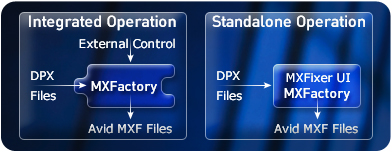
For maximum flexibility, MXFactory works independently so converted content can be imported later.
And with a suitable control script, you can batch process in advance of needing the program material.
What can you expect from ?
MXFactory takes video frames from a wide range of formats and creates an
Avid compatible MXF file in real time that will 'fast import' into most Avid systems.
| MXFactory will: |
| • | Create media suitable for 24, 25 or 30 Fps projects |
| • | Add metadata that will show up in bin columns |
| • | Add timecode and/or keycode information |
MXFactory can be used as a stand-alone application or fully integrated into a workflow.
It lends itself easily to customization.
MXFactory runs on Linux, Darwin, Windows 7 and 10.
Download the product information sheet.
|

|
|
MXFactory
$2950. USD
 MXFactory
 includes one year
of maintenance, support, & enhancements.
MXFactory Annual Renewal
Extend your unlimited free software updates.
Need help deciding?
Try MXFactory for 7 days.

*Note: The MXFactory Trial version places a watermark on the generated images.
for Linux, Darwin, corporate sales, or more info about MXFactory
|